Tiny6 – IPv6 in sensor networks
During the semester I spent in India from January to June 2008, I participated to the Tiny6 project between TELECOM Bretagne in France, the Indian Institute of Technology Guwahati (IITG) and an university in China.
Goal of the project
Sensor networks arenetworks of small nodes that communicate through a wireless link. They often use their own protocol to communicate together and with a machine that fetches data and makes them available on the Internet.
IPv6 is the next version of IP, the Internet Protocol. This new version provides much more adresses than the present IPv4.
All these adresses enable us to give a specific IPv6 adress to each mote in a sensor network, and to let them communicate through the IPv6 protocol. This allows us to simplify the network and make it more reliable by using many bridges between the sensor network and the Internet.
But IPv6 is made to be used with normal computers, while sensor nodes have very limited memory and computing ressources. So it is necessary to create a light protocol, this is what the 6lowpan working group has done.
In IITG, Alexandre, Antoine and me wanted to make this light protocol work on precise sensor nodes, and to let the nodes communicate through IPv6 with TELECOM Bretagne. We used the Matus Harvan thesis, a partial implementation of 6lowpan (IPv6, ICMPv6 and UDP are partially implemented) in NesC, a language used to program the motes, but for different motes.
Difficulties
The first difficulty was to understand how the motes and the Nesc language work. Nesc is a language derived from the C used to minimize the memory and CPU use. To program the motes, we used a base plugged in our laptop through USB. We used an adapted version of Xubuntu, XubunTOS in a virtual machine as an environment to program the motes and to connect them to the Internet.
We have then adapted the code of Matus Harvan to let it work on our motes, less powerful than the ones he used. Debugging the motes was a bit complicated because we had only 2 leds to make blink to know what was happening in the motes.
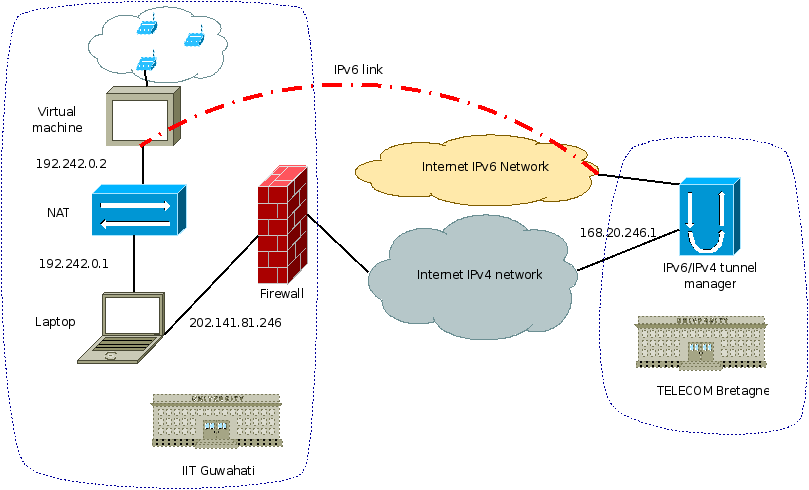
Finally we had to set up an IPv6 link between TELECOM Bretagne and the IITG. It proved to be complicated because the IITG had IPv6 adresses, but the routers of its access provider weren’t compatible. So we had to establish an IPv6 over IPv4 tunnel.
The most complicated in this project was to communicate with our indian supervisers. Many mutual misunderstandings made us waste a lot of time. It has for example been very complicated to get a routable IPv4 adress to communicate with TELECOM Bretagne. We had to work in the computer center, and the adress was only allowed to communicate with one server in TELECOM Bretagne.
Results
We finally managed to make the sensor motes communicate through UDP with TELECOM Bretagne, and send their measured data. But our will to make the network simpler was made difficult by the use of an IPv6 over IPv4 tunnel between the IITG and TELECOM Bretagne, and a NAT between our virtual and real machine: